CoolBasic websites now and in the past

The new coolbasic.com website went online yesterday. As I mentioned in the previous blog entry, the old placeholder webpage needed to be replaced, because it wasn’t designed to last as long as it now seems it’ll take until launch of CoolBasic V3. It took me one day to build from scratch, but overall there’s much more effort into it. In addition to creation of the CSS-stylesheet and the HTML layout, there’s now a nice feature on the main page that lists recent forum posts and blog entries. Those listings required some manual SQL-queries for two databases on the web server.

I made some archaeological digging, and managed to find all previous websites of CoolBasic ever created (this is fun to watch). Let’s take a tour, beginning from the oldest:

Gigabot original Website, 2003

Gigabot original Website, 2003

First of all, those of you who are familiar with the history of CoolBasic, know that it all began off an idea of making a “programming game”. The game idea is simple – players would need to script an A.I for two bots. These bots would then fight each other, in an arena, and using an array of provided weapons like laser cannons and missiles. During the actual match, the players cannot affect how it goes. The bots simply rely on their A.I scripts until the other gets destroyed. The screenshot above is the original Gigabot homepage (2003). The game never finished (though I’ve thought about re-opening the project some day), but instead it evolved into something we know today as CoolBasic!
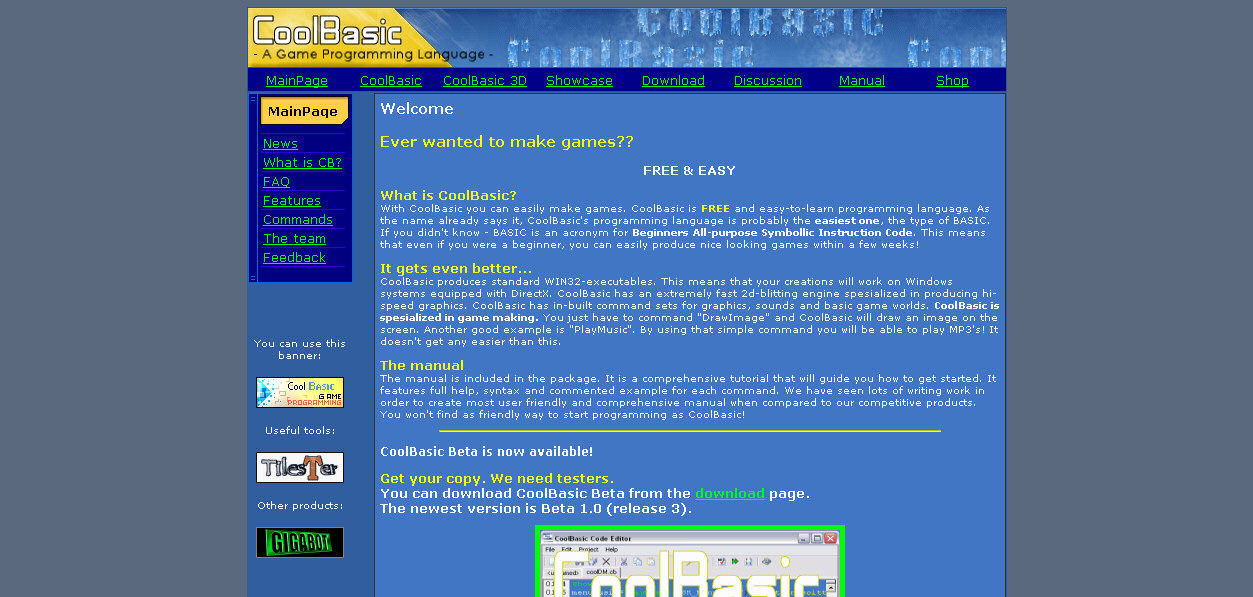
The very first website, 2004

The very first website, 2004

The first ever (official) CoolBasic website looked like that. Yep, it’s awful, and it’s from 2004 (Beta 1.0 release3). My www design skills clearly weren’t too good back then 🙂

The first 'real' website

The first 'real' website

Sadly, I couldn’t find this website anywhere. However, forum member Jare managed to find it from the Web Archives. I think it dates back to the late of 2004. It resided on a MBnet server which is a hosting service for a Finnish computing magazine, MikroBitti’s, subscribers. The current version was Beta5 (2nd re-write of the 1st generation).

Website for the current version (2nd generation), 2004/2005
Website for the current version (2nd generation), 2004/2005


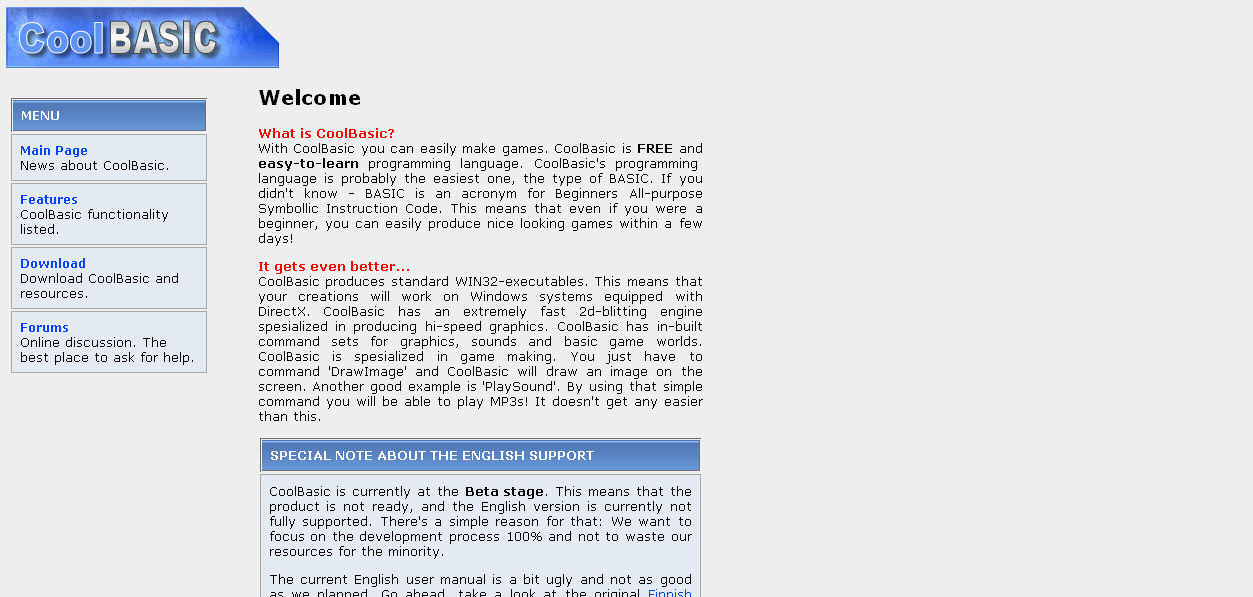
The english website, 2005

The english website, 2005

Then there was the famous Blitz battle which lead to complete re-write of CoolBasic, introducing Beta 10 -series and the Object System. Also known as the current version, the 2nd generation. At this point, I registered domain coolbasic.com, and factored a new website seen in the image above. The files date back to 2004-2005. At this point, CoolBasic also got some (unwanted) international attention which lead me to build a fast partial english localization of the manual and the website. The english support never got finished because of my famous take off, but proper localizatoin is something we’ll definately improve for CoolBasic V3.

The temporary placeholder, 2008

The temporary placeholder, 2008

If you haven’t yet read the previous blog entry, I strongly recommend to do so now.

When I made the come-back, CoolBasic V3 development was established (mainly because I realized how awfully outdated the Beta 10 was). The website was also totally out-of-standards, so I had to get rid of it as fast as possible. CoolBasic websites in general follow medium saturated colour theme. This “placeholder” was not an exception, but due to my mindset of “insignificancy” at that time, the technical aspect wasn’t taken care of in such quality I normally would have done.

The better placeholder, 2009

The better placeholder, 2009

This brings us here, the new “placeholder” website. I made an intrepid decision, and used black background this time, as opposed to pretty much any of the previous websites. A good website uses a palette of 3-5 colours to form its theme and feel. I picked yellowish orange and neutral blue that resembles the gutter bar of the current CoolBasic code editor. The orange is great for emphasizing text content, and blue would style all other elements that are not normal text, such as headers and links. The most difficult part was picking the correct blue hue because it easily banks towards cyan which is too bright for headers compared to the normal text, or dark blue which is too hard to read on a black background. Based on feedback, the colour theme succeeded; it’s easy to read, not too jumpy, and page elements stand out quite well. I’m glad to hear that 🙂

To enhance impression, I also did some artwork on the header and footer, to remind of a Game Creation tool here: This business is tied around entertainment after all. It’s not too obvious, but I bet it creates some subconscious images that support CoolBasic as a product. High-resolution textures and reflections create impression of the multimedia involved. And then there’s of course the never-dying logo of the “cool” Ice Cube.

There’s also some tech involved. I don’t have fancy ASP.NET support on my web server, so my options are quite limited of what comes to content publishing systems such as MS Sharepoint or Elevation. So I use PHP and MySQL. In this particular case, I had to integrate with phpBB3 and WordPress databases in order to compose a list of the latest entries shown on the main page. This is the first time I actually need SQL for my webpages, so I decided to do this properly and wrote a complete PHP5 SQL class (objects and classes are not supported until version 5) I can use for later cases, too. Those listings change according to the selected language of the website, too. I’m actually surprised that I managed to get this all running in just one day.

Now that I have stabbed both the official forum PHP code and the blog JavaScript code, I decided to establish a development environment on my laptop. Thanks to this “sandbox”,I no longer have to upload the scripts just to debug/test them. As a result I now have a complete copy of the forum, blog and the website, running on my localhost. All further development can be done locally on my laptop which is fast and painless. This gives me time to test things through properly before uploading to the production environment where the changes “go live”.

Bonus
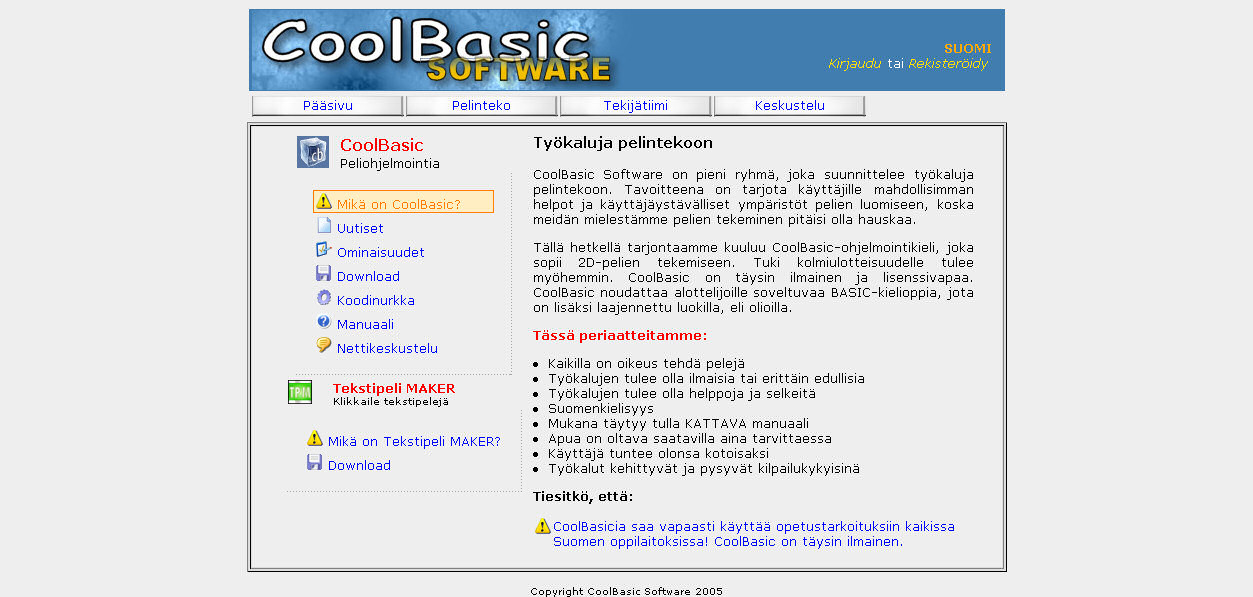
When I was digging for those old websites, I came across something that you guys have never seen before, but something that apparently was supposed to be the next CoolBasic website. In addition, there’s also a pic of CoolBasic’s supposed new manual front page. These files date back to 2007. Please note that these never went live, and never will. I have something completely different planned for CoolBasic V3 🙂
The unpublished CoolBasic Website, 2007

The unpublished CoolBasic Website, 2007


The unpublished CoolBasic User Manual front page, 2005/2006

The unpublished CoolBasic User Manual front page, 2005/2006

OK, back to Pass#2 coding…

Web design by the trends

As Pass#2 is still progressing nicely (I think I’ve solved some recent problems rather well), a few other non-compiler related issues have risen – and why not, it’s refreshing to do something else for a change. These issues concern about the website of current coolbasic.com, and I also made some improvements to the blog. For reference, both rely on PHP technology of which I have moderate experience as a developer. But first, let’s prelude the article:

So what’s wrong with current coolbasic.com? If you remember the original website, you’d agreed with me that it was quite outdated from both design and technical points of view. General designing trends (these include the look and feel of the page, as well as way of navigation) tend to go together hand by hand with standards set by the current generation of Operating Systems. They show the road, they define the brands, and they set the rules what is “cool”. This phenomenom is best illustrated by studying the average color saturation and spectrum of hues of webpages, and then comparing them to color scheme of, say, the latest Windows. By no means, I’m not drawing too genral point here – of course websites vary a lot! But reasons for these often origin from how business works… It’s all about money, and therefore webpages (especially large, enterprise level ones) do not update as frequently as they’d like to. Of course Operating Systems want to make as positive a first impression as possible, and that’s by defining the new design so that the consumers would get a concrete evidence of change. Not many people are interested in a listing of improvements. But if the Internet gets filled with good looking images of what the new version would look like, it’ll hook people’s interest. Today’s market absolutely require competitive esthetics of a new product. The proof is there: remember the looks of Windows 3.1 compared to DOS? Remember how Windows 95 revolutionated the usage? Remember the graphical innovation of a Windows XP? And now we have the cutting-edge candy – Windows Vista. And that’s only the Windows’ part, Mac OS is quite good-looking too!

Enough stuttering
The original coolbasic.com website had the (now considered narrow-minded) trend of a Windows 2000 -style square layout, and medium saturated color scheme. Graphics didn’t play as outstanding a role as for what we’d have seen for the XP trend. In other words, text was the dominating element of the first glance. The page consisted of a “title bar” (featuring CoolBasic logo), a typical top-level side-by-side menu, the actual content of the page, and the footer (which essentially only had a copyright notice and a bottom margin). And since the “defining logo” of CoolBasic is the “Ice Cube”, the color scheme was “cool as lightish blue”. I also have to admit that the text contents of the website followed a poor design, too. Not in a complicated sense, but more like it lacked everything that makes navigation “good” and “nice to use”. Not really phenomenal web design… and it was a pain to maintain too, because of no dynamic content generation PHP would normally be perfectly capable of. All this happened a few years ago. Back then I also lacked the skill and perfection of CSS styling. I should have redesigned the website before I took the famous few years off from the CoolBasic project. And that crappy site page remained there for.. what.. is it like 3 or so years!

So when I did come back (and started designing the concepts of CoolBasic V3) in summer 2008, I wanted to get rid of that awful website that was by no means not by the trends of today at all. The original plan was to quickly construct a simple place holder webpage (the current one) which would give me enough time to compose a proper one. I had a cool vision on how the CoolBasic V3 brand would look like. But why ruin the element of surprise (the brand) by introducing the new website beforehand? Also, it’s good to keep the design somewhat close to the current product (Beta 10 of the old CoolBasic generation) until CoolBasic V3 is really knocking on the door. So I decided to refrain from releasing anything related to the new brand until I make it all official some nice day where the CoolBasic community will wake into the wonderful morning of new cool era.

Sooo… no new website brand until CoolBasic V3 alpha. Well, I’m not really happy with the current place holder either. Since the intention was to quickly construct a temporary webpage just to dump the old one, I must say that I could have done a better job at it. It doesn’t pass XHTML 1.1 validation, and all in all it has some elements that are now considered “obsolete” or “outdated”. I already heard some nagging about it, so during the next weekend I intend to build yet another place holder webpage, but in better quality this time. It will be designed to last until introduction of CoolBasic V3. Soon after it’ll be replaced with the the final website (of which I already have templates made).

Improving the blog
Since we’re on the business of software development tools, namely game making IDEs, and because CoolBasic is our only product as it stands, and because CoolBasic just happens to be a programming environment, I will be pasting a lot of code snippets to future-coming blog entries. WordPress sure has the “code box” feature, but text inside those elements will just render fixed width, and easy-to-read “coding” characters. There is no further styling, and it can’t handle text indentations properly. On top of that, long lines will wrap annoyingly, and long code makes it irritating to read other blog entries. Fortunately there are lots of syntax highlighting plug-ins available for WordPress. I found one rather popular and seemingly working highlighter called “Google Syntax Highlighter” by Alex Gorbatchev and Peter Ryan. This awesome plug-in enables me to paste CoolBasic V3 code snippets, and they get fully syntax highlighted and text indentated within the blog. I created a custom language brush specialized in CoolBasic V3 syntax, and according to my tests it’s currently working like a charm.

However, there are some limitations with the highlighter. When I wish to paste a code snippet, the code must be written like this:

<pre name="code" class="cb:nogutter:nocontrols">
// Insert code snippet here...
</pre>

Otherwise the component would render an annoying line numbered left margin (the “gutter”) to the code, and a stupid “tool box” that has quick links for printing and stuff like that. In order to remove those, I had to write some overriding code to the java script engine of the highlighter. The new presentation is now:

<pre name="code" class="cb">
// Insert code snippet here...
</pre>

Also, all code boxes now appear inside a scrollable box (with its max height limited). No more gigantic and hard-to-read blog pages ruined by long code snippets. After these modifications only one thing needed to be fixed: Most browsers break lines with a hyphen, into several lines. Other characters with similar behaviour include common coding separators such as opening parentheses and commas. Scrolled area also appeared ill-colored with the default styling. I solved both problems with customized CSS. You’ll see the code box control in action in future-coming blog entries.

Name Resolution

So I thought that I’d get an easy start to Pass#2 by first developing the constant value pre-calculator. It seemed like a logical thing to do for starters because those pre-evaluated values will be needed in the actual compilation of executing code. So I started writing a procedure that iterates all constants from the symbol table, and then calculates their values. I had all these circular reference algorithms planned out and so on. But of course surprises do happen (actually I should have seen this coming from a mile away), and I figured that before I can implement this fancy stuff, there are a few other things to take care of.

Wait, isn’t that the same precise thing I experienced in the beginning of Pass#1… oh, umm.. Yes it is! Back in Pass#1, I was hoping to get an easy start with simple statements such as Repeat…Until. But there’s no such thing as free lunch; I had to write the containing elements first (d’oh, of course!). Those being classes, functions and so on. On top of that, those statements just happened to be the most complicated ones, so plenty of general-purpose parsers needed to be written, too. So Pass#1 was quite frontloaded instead of backloaded a burden to chew on. As I’ve written in previous blog entries, the ending of Pass#1 went relatively quickly, and was just a copy-paste fest for the most part.

So what’s the frontload here in Pass#2? Well, even though you now got your pretty symbol table and the source code on a silver platter, you will still need to solve the identifier name references correctly because constant expressions can have constant identifiers in them. These references couldn’t be made in Pass#1 because identifiers can be declared in random order. Sooo… now you find yourself together with Mr. Name Resolution. Oh, and also, please meet his brother Mr. Overload Resolver. Oh, and don’t forget their sister, Ms. Template Expander. Whoah, so I suddenly have these 3, mean looking procedures on my face – right from the start. I’m not kidding, these are probably THE 3 most difficult entities for Pass#2. And again, they must be almost completely implemented before proceeding onto further tasks. Okey, the Template Expander can wait a little bit. I can probably get this pre-calculator to work correctly on *simple code* with just the Name Resolution algorithm implemented, but the 2 remaining villains need to be taken care of soon after.

Name Resolution is essentially the process of matching source code identifier names to their actual declaration. An identifier can be located in some of the upper levels or in a completely different branch within the program hierarchy. When the identifier reference is being resolved, also the access modifiers are taken into account. All this follows a specific rule-set of the OOP member accessing. Basically, an entity always has access to upper levels, but requires Public access for branches. Inherited class-based reference to base classes can also have Protected access. Combine these to overloading, shadowing (hiding by name) and procedure overriding (hiding by name and signature), and you got yourself a nice little soup. But these are my problems anyways 🙂

I have formulated algorithms for both constant expression calculation and name resolution, and I expect to carry them out during the up-coming weeks. The pre-calculator will be a big chunk of code. At this point in development, things get really interesting (and challenging).

Pass#2 is looming just behind the corner

All those 64 parsers of Pass#1 have now been written and tested. And that’s a lot of code! Virtually every statement has now had its parser implemented, even though some of those statements will probably be disabled for the first few alpha releases. I’m kind of relieved as I’ve now reached a “check point” in the development process. Yet there’s a lot more to come. All in all, I think it’s safe to say that I’m closing in the halfway of the entire compiler now that Pass#1 is ready. The compiler made it through the baptism of fire, by properly parsing a few-hundred lines long complete test class source code.

This means that given the source code of a random test program, the compiler has now performed syntax checks for all elements of it, and that there’s now a complete symbol table for Pass#2 to play with. All metadata has now been gathered… Pass#2 has all the info it needs in order to complete the transformation into the Intermediate Language. If Pass#1 was essentially the Parser, then you can consider Pass#2 the actual Compiler; Its main job is to process the executable code within procedures – and to order it in a meaningful way. Pass#2 is a very, VERY complex process, and it has a lot more tasks than Pass#1 had. I have already assembled a list of those tasks, but I’m not going to share it just yet. I’d rather divide them into smaller topics and discuss them separately in future blog entries.

There are few preceding steps before Pass#2 can start crunching the procedure code. One of them is Interface merging and the other is the pre-evaluation of constant value expressions. The latter is probably more challenging with all this circular reference thing going on. Other “difficult” parts of Pass#2 include Name Resolution, Overload Resolver and the actual Expression Transformer. More about those later. All I wanted to say, was that there’s much work to be done, and it’s getting more difficult now. Bleh, I’m probably going to be spending even more time just thinking things through before implementation.

ValueExpressionParser()

Pass#1 consists of dozens of parsers. All the “container” statements are already implemented and those missing are the “regular” statements i.e statements that can only be written inside a procedure which carry the actual program flow. I had no need to parse value expressions until now as I got started with statements such as If, Until, While, etc. Most of these standard statements include parts where a value is expected. And value is evaluated from an expression. Expressions can contain operators and operands and together they form a mathematical formula. A result of an expression can be a single value of any data type defined within a CoolBasic program.

The constant value expression parser was made long ago when I was writing the Function statement parser. It converts the expression to postfix notation and then attempts to evaluate it. It was perfectly sufficient for the job, so I decided to try out the same technique for the value expression parser aswell. Value expressions allow practically all expression elements whereas the constant parser implementation was merely partial due to the amount of “illegal” elements for a constant expression. The value expression parsing algorithm grew soon in size and wasn’t exactly the most enjoyable to debug with. Also, the more complicated expression elements such as jagged arrays caused all kinds of nasty problems that would have required ugly exceptions to be made for the algorihm. In order to debug the algorihm perfectly I needed long and complex test expressions. And since you’d need full debug info of what’s currently in the output queue, operator stack, and what’s the current state of the expression, it quickly lead to nice little flood in my Compiler debug window.

So I discarded the entire parser code, and started to think of new ways to check validity of a value expression. After sprawling on the couch (once again) for a couple of hours, I came up with a solution. I’d continue doing things just like I had been doing the entire time for Pass#1. Even expressions can be broken into smaller peaces, and each piece can be validated separately. One error, and the entire expression fails. Sounds like yet another great use of recursion, uh?

If you read compiler literature you’d notice that there are mainly two kinds of commonly used algorihms (not including their sub versions): The LL and LR parsers. They both scan expression terminals from left to right, and try to satisfy the requirements of an expression. The LL-parsers do this by forming the entire expression as a product of terminals and operators it comes across with, whereas the LR-parsers try to simplify the expression down to a single product. These algorithms are also known as “Top-down” and “Bottom-up” parsers. Since basically recursion is like a stack, the easiest way for me, was to use the Bottom-up parsing technique. It’s not by the book, but the basics are the same: Every time a value is expected, new recursive call is initiated. I’m not going to delve into details, but it appears to be working like a charm. Later on I also replaced the constant value expression parser.

So what this means, is that unless I hit unexpected problems, Pass#1 is finally coming toward its end. I still have lots of parsers to implement, but most of them are very simple. I should now have almost all bits of a statement, implemented as a parser. It’s just a puzzle left I need to put together with ready-to-use pieces.

Assigning stuff

C-languages (and the like) make difference between the “assign” operator and the “comparison: equal” operator, as opposed to BASIC-languages where both share the same symbol. The other assign operators such as “+=“, “-=“, “*=” and “/=“, in comparison, operate the same way in both languages – almost. In C-languages you can use assign operators pretty much anywhere within expressions because unlike in BASIC-languages, they return the value that was just assigned. That’s why you can use “a=b=c=1” in C, and have all the three variables be assigned a value of 1. In BASIC-languages, where symbol “=” defines the comparison operator, the same statement would equal C-expression of “a=(b==c==1)” which would result in a boolean value of True or False to be assigned to variable a, depending on the values of b and c.

The problem in BASIC-langages is that the compiler can’t tell whether the user wanted to express an assignment or a comparison with symbol “=“, except for the first one in line; the rest are considered “comparison: equal”. BASIC-language parsers typically distinguish these two operators (that share the same symbol) by context: Are we expecting a value here or not. Therefore, by design, BASIC-language assign operators don’t return a value. Unfortunately, nor do any of the other assign operators: “+=“, “-=“, etc. because of consistency. Thus you can’t do loop auto increments like:

While ((myVar += 1) < 10)

In addition, since no value is evaluated by the assignment you can’t have the operation applied before/after evaluation, like the “++” and “--” operators in C do (they can appear before or after a variable). In addition, the “--” as prefix has also a double meaning: it can either be decrement before evaluation, or a double unary minus. Too much noice here. And that’s why those operators are missing from most BASIC-languages including VB.NET – and they won’t make it to CoolBasic either. You will be able to use “i += 1“, but not within a value expression.

In summary, these are the assign operators that will be implemented to CoolBasic V3:
"=", "+=", "-=", "*=", "/=", "<<=" and ">>=".

Edit 15.5.2009: Fixed typos.

Annoying syntactical exceptions

So I have been writing these Pass#1 statement parsers for a while now (a bit more than 20 more to go). Recently, I came across with the Declare Function statement. It’s responsible for declaring a function from an outside resource – for example, a DLL-file. The general guideline is that all statements would look the same as the corresponding statement in VB.NET. So I began the normal procedure I do with every new statement parser, i.e type in a sample code in a source file which will then be passed to the compiler. Now, the first thing to do is to enable the parser function in question and then create the parser skeleton for quick OK check. I was surprised to notice that the compilation failed due to syntax error before the code line got even passed to the main parser function. The VB.NET syntax is as follows:

Declare Function MyFunc Lib "System.DLL" Alias "_RealFunctionName" ( [params] ) As [type]

Now the general syntax rules define that a literal cannot appear just before an opening parenthesis. And well well, isn’t that a string literal and a parameter list just after. I was first like, WTF how can I “fix” this in a non-ugly way without breaking the general syntax rule set. I had three choises, none of which seemed good way to go:

  1. Allow a string literal to precede an opening parenthesis
  2. Allow a string literal to precede an opening parenthesis only in a Declare statement
  3. Alter the syntax of the Declare statement

Definately not Option 1. Option 2 seemed to be the best choise because I still did’t want to alter the syntax of the statement. But that would have been an exception to the syntax rules. I don’t like exceptions in any program structure, because in the end, it will make code maintenance messed up. I thought about pros and cons of options 2 & 3 for a long time. I could have added a small keyword between the string literal and parameter list. The resulting statement syntax could look something like this:

Declare Function MyFunc Lib "System.DLL" Alias "_RealFunctionName" Ansi ( [params] ) As [type]

…where “Ansi” could be, for example, a charset modifier (Ansi/Unicode/Auto). On the other hand, charset modifier is already an optional modifier in the VB.NET syntax; its place is right after the Declare keyword. CoolBasic won’t provide support for charset modifiers just yet (since it’s optional I can add it later on without breaking all existing CoolBasic source codes which would make users angry).

Another solution for Option 3 would be to define Alias as identifier instead of a string. The syntax would look something like this:

Declare Function MyFunc Lib "System.DLL" Alias _RealFunctionName ( [params] ) As [type]

It seemed like a good idea at first, but come to think about it the solution would be logically wrong. By definition, all identifiers should be usable by the programmer. In this case, the Alias identifier would not – or it would be unintended identifier reserving a name without real operational use. At this point I ran out of options. This isn’t by the best practise, but I decided to go for Option 2. Luckily I’ve designed the lexer to be quite flexible so I only needed a small change in one place, basically overriding a syntax error based on a simple condition of few preceding line tokens.

As a result, the syntax will be exactly like in VB.NET, as intended. Internally, the fix didn’t end up being as ugly as I had feared. Overall, I’m content with the outcome. Pass#1 continues…

CoolBasic Program Skeleton

The leap from a procedural language to an object oriented language is huge for both the designer (me) and the user. I have established the guidelines and practises how CoolBasic programs need to be built, and I’m already seeing light at the end of the tunnel (which doesn’t, however, mean that I’m nearing the end). From the user’s point of view the change is so big that CoolBasic V3 can be considered completely different a language from what it used to be. And it is. You are going to be writing slightly more code to achieve same results compared to the current CoolBasic (that never got past its Beta stage haha).

In OOP languages, all executing code must be written inside a procedure. I say procedure, because it’s a uniting term for Functions, Properties and Operators. This means that the main loop of a game must also be inside a Function. Since functions can only appear within the module context, you must define the containing module or class. You can’t call the starting code from outside, so the concept of Main Function needed to be implemented. What this means, is that you must always write Function Main() somewhere in your root level Modules. It operates as an entry point to your application. Only one Main Function can be defined. The concept is similar to .NET languages and C/C++.

It may seem like much, but in the end it isn’t. Sure you have to build all programs in a certain way based on a skeleton, but after that things get simplier. The following code demonstrates a simple HelloWorld program. It will require 11 lines of code whereas the old CoolBasic only required four lines. But you really can’t simplify things any more than that in the OOP world. This can be confusing to newcomer programmers, so perhaps when you create a new project in the CoolBasic code editor, this skeleton could be automatically typed in – for reference and easy start.

Simple HelloWorld Example

Simple HelloWorld Example

Please note that the example program above is subject to change, and is most likely not final. Most of the example’s code lines belong to the frame you need to define. The main loop is still quite simple. First we open a windowed game screen of 800×600 dimensions. Then we loop two lines of code (text drawing and screen updating) until the Screen is closed. The biggest challenge is to memorize all new classes and their methods. A brand new, comprehensive and user-friendly manual will help with this, and perhaps I’ll implement some kind of an intellisense-prompt to the editor at some point.

A short update on CoolBasic V3 compiler progress: The above example fully passes the lexer, and soon the parser (Pass#1) aswell. All in all, I need to implement the parsers in the same order as one would write code to a program; containers first and then the statements. It’s slow in the beginning due to the complex structure of, say, Function statements and such, but the rate should accelerate when I progress through the simplier statements in the end. I recently finished the Function statement parser which is one of the largest and most complicated parsers, and I feel good about it; solid ground is the key to success. I expect to implement the Class and Interface parsers in the near future.

Parsing in Segments

Pass#1 is responsible for so many things it needs to be designed very carefully. I have come up with a plan about the remaining compiling phases: There will be 3 or 4 passes in total of which Pass#1 is the parser. Its main job is to compile the symbol table for the source code, and generate variances of the generic classes and functions. In short, it will prepare the source code for Pass#2 where the actual compilation of each procedure takes place. Of course, this involves making the code as clean as possible by removing modifiers and certain other structural “particles”.

Parsing in general can be quite difficult a task, but this time I’ve taken entirely different approach. As we begin Pass#1 (for each line separately) some basic syntax checks have already been done. Therefore we can safely assume that the line always begins with:

  • Pointer literal
  • Identifier
  • Label
  • Full-line special data segment
  • Keyword

Each of which launches a mini-parser of their own. These include ParseKeywords(), ParseStatementValue(), ParseAssignment(), ParseParamList(), ParseDeclaration() and ParseModifiers(). They scan the terminals of the current line by segments, i.e group terminals based on which class they belong to. All this is done recursively so in case of a failure, the entire call stack rolls back, ultimately terminating the entire compiling process. The pros of the recursive parsing is that it allows a flexible identification of expressions which belong to a multi-part statement such as the For-statement.

In addition, all in-built statements have their own parsers that make sure the keyword has been used within a proper declaration context, and that those statements that define a code block, follow a valid hierarchical structure. As many syntax checks will be made as possible, but the final compilation in Pass#2 will detect the rest of them.

CoolBasic V3 follows very sophisticated and strict syntactical rules similar to VB.NET. This means that in order to parse a simple Break-statement I must first establish the base for parsing modifiers, Modules, Functions, and Repeat…Until. In another words, I must first set up alot of functions just to get things running by putting it all together for the minimum. Lots of code is required before I can even run the basic tests (for example scope list and the symbol table). Pass#1 is coming along nicely, though.

Compilation: Pass#1

Since I decided to add cross-reference support for CoolBasic (see blog entry “Highly Modular”), some major changes to the entire process were needed. Therefore, I’ve rewritten the lexer in preparation for Pass#1. Due to the nature of these changes, the way inner lists work also needed a review. I’m quite happy with the results. Lexing algorithms improved, for example the assignment operator is now better distinguished from the comparison operator. The assignment is now automatically cast for statements like Optional in function declaration, variable declaration, or the For…Next assignment. This will ease further parsing in Pass#1 and Pass#2.

Pass#1 compiles the symbol table i.e list of all identifiers. Basically, the compiler will scan for declaration statements and then create a collection of their names. Some secondary information such as path, relationship, block entry/end and signature are also formulated. Pass#1 can also process the hierarchy integrity as well as perform some initial checks to the syntax. We can’t create exact pointers to parent entities yet because program structures can be declared in random order within the source. Other tasks include generation of enums and trimming the code from entity modifiers. In general, Pass#1 is just a fast sweep and it doesn’t analyse the syntax in great depth. Deep scan belongs to Pass#2 and perhaps Pass#3.

Constants are interesting because they can be used to define each others, for example Const a = 1 : Const b = a + 3. It’s, however, possible to create a circular reference which renders the evaluation of the constant’s value, impossible. You can’t make exceptions to the general reference resolver (requiring Constants to be always declared before using) either. Being unable to specify constants as part of another constant expression, is stupid, too. This means I have to implement a recursive search at later passes when constants’ true values are pre-calulated. Pass#1 doesn’t yet do anything about the constants’ values anyway. In VB.NET constants aren’t really replacing values within the source; they’re constant variables i.e Static ReadOnly. They are, however, pre-evaluated at compiling time to determine constant expressions and thus discarding false condition code blocks. This is where CoolBasic will differ – constants will be transformed into literal values which means speed increase at runtime.

More about Pass#2 when I’m done with this…

Copyright © All Rights Reserved · Green Hope Theme by Sivan & schiy · Proudly powered by WordPress